Hosting Private Angular Applications on AWS with S3 and Internal ALB
This guide shows how to host an Angular application privately on AWS using S3 and an Internal Application Load Balancer. The application is only accessible from within your VPC—there are no public endpoints.
Overview
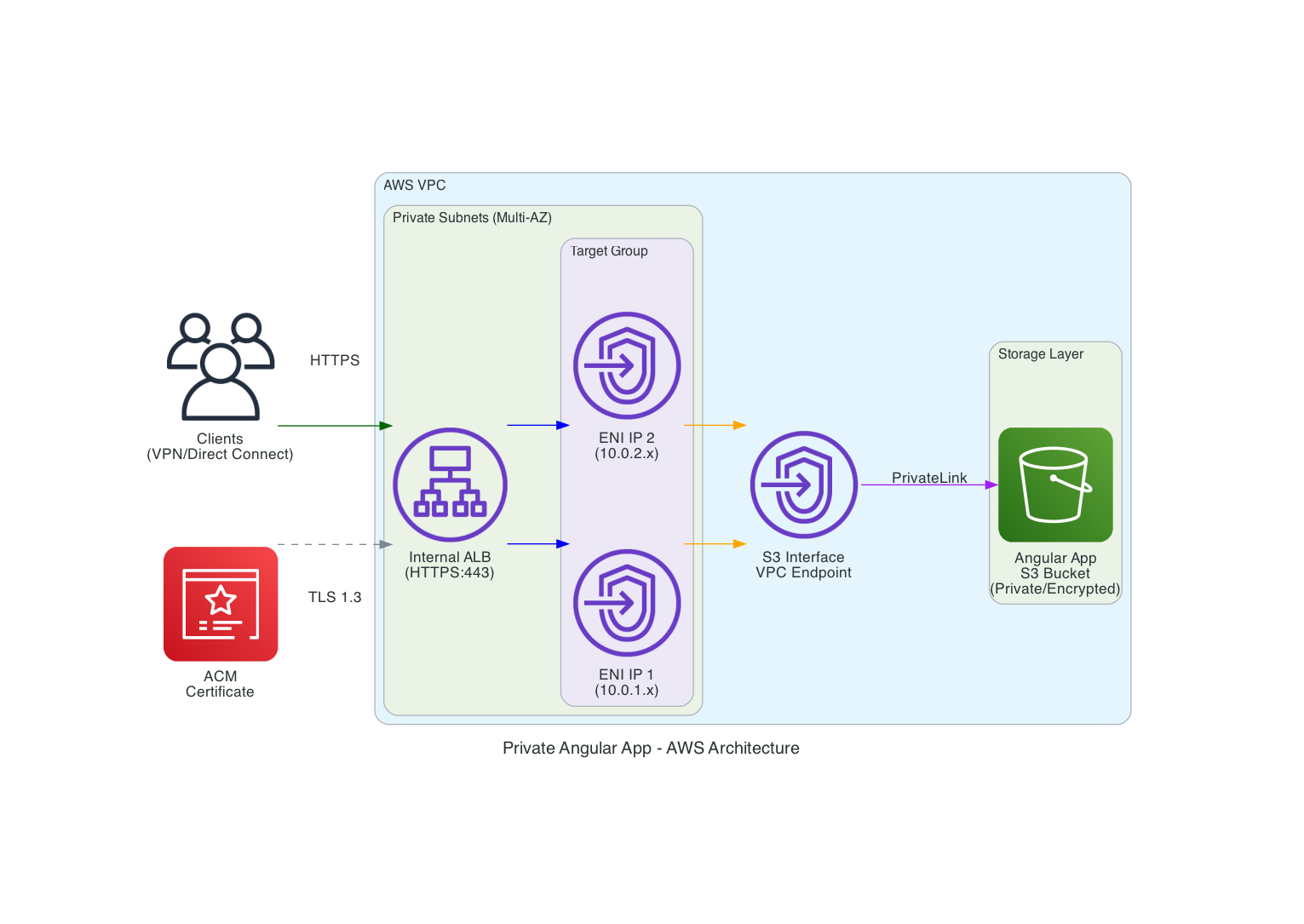
This architecture serves Angular applications from S3 through an Internal ALB, using a VPC Endpoint to keep all traffic private.
What you get:
- Application accessible only from your VPC (via VPN or Direct Connect)
- No EC2 instances to manage
- S3 handles storage and scaling
- Full support for Angular's client-side routing
How it works:
- Users connect to your VPC through VPN or Direct Connect
- Requests go to an Internal ALB (no public IP)
- ALB forwards requests to S3 through a VPC Endpoint
- S3 serves your Angular application files
Components
- Internal ALB — Receives HTTPS requests, only accessible within VPC
- Target Group — Routes traffic to VPC Endpoint IPs
- VPC Endpoint — Connects to S3 without internet access
- S3 Bucket — Stores Angular application files
- ACM Certificate — Provides HTTPS encryption
How Angular Routing Works
Angular uses client-side routing. When a user navigates to /dashboard, the browser requests that path from the server. But /dashboard doesn't exist as a file in S3—only index.html and the JavaScript bundles exist.
The ALB solves this with listener rules:
- Priority 10-13: Patterns like
*.js,*.css,*.png→ Forward to S3 - Priority 50: Root path
/→ Redirect to/index.html - Priority 100: Catch-all
/*→ Redirect to/index.html
Static files go directly to S3. All other requests redirect to index.html, which loads Angular, and Angular handles the route.
Get the code: github.com/CC-Tech-Digital/private-angular-app
Prerequisites
Your network team needs to create these resources first:
- VPC — At least 2 private subnets in different Availability Zones
- VPC Endpoint — Interface type for S3, Private DNS must be disabled
- ALB Security Group — Allow HTTPS (443) inbound from your user network
- VPC Endpoint Security Group — Allow HTTPS (443) from ALB security group
- ACM Certificate — Valid for your application domain
Get VPC Endpoint IPs
After creating the VPC Endpoint, get the private IPs:
aws ec2 describe-network-interfaces \
  --filters "Name=vpc-endpoint-id,Values=vpce-xxxxx" \
  --query 'NetworkInterfaces[*].PrivateIpAddress' \
  --output text
You need these IPs for the Target Group configuration.
Deployment
Step 1: Create Parameters File
Copy parameters/template.json and fill in your values:
[
  {"ParameterKey": "ProjectName", "ParameterValue": "my-app"},
  {"ParameterKey": "Environment", "ParameterValue": "prod"},
  {"ParameterKey": "VPCId", "ParameterValue": "vpc-xxxxx"},
  {"ParameterKey": "PrivateSubnetIds", "ParameterValue": "subnet-aaa,subnet-bbb"},
  {"ParameterKey": "VPCEndpointPrivateIPs", "ParameterValue": "10.0.1.50,10.0.2.50"},
  {"ParameterKey": "VPCEndpointId", "ParameterValue": "vpce-xxxxx"},
  {"ParameterKey": "ALBSecurityGroupId", "ParameterValue": "sg-xxxxx"},
  {"ParameterKey": "DomainName", "ParameterValue": "app.example.internal"},
  {"ParameterKey": "CertificateArn", "ParameterValue": "arn:aws:acm:..."},
  {"ParameterKey": "EnableAccessLogs", "ParameterValue": "false"}
]
Step 2: Deploy the Stack
aws cloudformation create-stack \
  --stack-name my-app-prod \
  --template-body file://infrastructure-stack.yaml \
  --parameters file://parameters/prod.json \
  --capabilities CAPABILITY_AUTO_EXPAND \
  --region us-east-1

aws cloudformation wait stack-create-complete \
  --stack-name my-app-prod \
  --region us-east-1
Step 3: Get the S3 Bucket Name
aws cloudformation describe-stacks \
  --stack-name my-app-prod \
  --query 'Stacks[0].Outputs[?OutputKey==`S3BucketName`].OutputValue' \
  --output text
Step 4: Deploy Your Angular Application
npm run build

aws s3 sync dist/your-app/browser/ s3://BUCKET_NAME/ --delete
Step 5: Configure DNS
Create a DNS record pointing your domain to the ALB. For Route53 private hosted zones, use an alias record.
Get the ALB DNS name:
aws cloudformation describe-stacks \
  --stack-name my-app-prod \
  --query 'Stacks[0].Outputs[?OutputKey==`ALBDNSName`].OutputValue' \
  --output text
Step 6: Verify
Check that the ALB targets are healthy:
TG_ARN=$(aws cloudformation describe-stacks \
  --stack-name my-app-prod \
  --query 'Stacks[0].Outputs[?OutputKey==`TargetGroupArn`].OutputValue' \
  --output text)

aws elbv2 describe-target-health \
  --target-group-arn $TG_ARN \
  --output table
Both targets should show healthy.
Updating the Application
To deploy a new version:
npm run build
aws s3 sync dist/your-app/browser/ s3://BUCKET_NAME/ --delete
Changes are live immediately. No infrastructure changes needed.
Troubleshooting
Targets Show Unhealthy
- Verify the VPC Endpoint IPs in your parameters match the actual ENI IPs
- Check that the VPC Endpoint security group allows HTTPS from the ALB security group
403 Forbidden
The bucket policy may have the wrong VPC Endpoint ID. Check it:
aws s3api get-bucket-policy --bucket BUCKET_NAME
The aws:SourceVpce condition must match your VPC Endpoint ID.
Deep Links Return 404
Verify the listener rules exist and have the correct priorities. Static asset rules should be 10-13, root path should be 50, and catch-all should be 100.
Cleanup
aws s3 rm s3://BUCKET_NAME --recursive

aws cloudformation delete-stack \
  --stack-name my-app-prod \
  --region us-east-1
Note: The S3 bucket has a retain policy. If stack deletion fails, delete the bucket manually first.
Repository
The CloudFormation template and full documentation are available on GitHub:
https://github.com/CC-Tech-Digital/private-angular-app
Summary
This architecture hosts Angular applications privately using:
- Internal ALB for HTTPS termination and routing
- VPC Endpoint for private S3 access
- S3 for storage and serving files
- ALB listener rules for SPA routing support
All traffic stays within AWS. There are no public endpoints.
Ready to elevate your strategy?
Schedule a call with our experts today and unlock your business's potential.